
Turn street-level photos into GPS coordinates. No metadata required.
An open-source AI geolocation system inspired by GeoSpy. Identifies locations by detecting and matching building features from photographs using SAM3, ResNet50, and FAISS vector search.
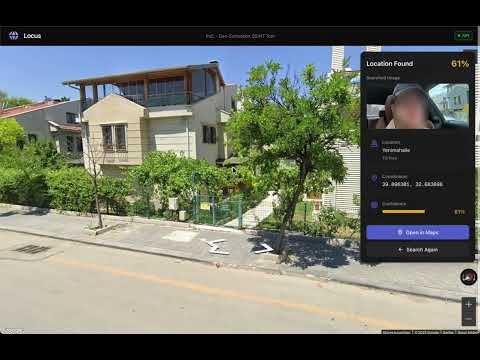
Locus uses a two-phase approach: Train to build a location database, and Search to identify locations from photos.

- GPS Point Sampling - Define a center location and radius, system samples GPS points in a circular pattern
- Street View Collection - Fetches multi-directional images (0°, 90°, 180°, 270°) from each point via Google Street View API
- Building Detection - SAM3 (Segment Anything Model) identifies and segments individual buildings in each image
- Crop & Normalize - Extracts each building as a separate 224×224px image
- Feature Extraction - ResNet50 CNN generates 2048-dimensional feature vectors for each building
- Vector Indexing - Stores vectors in FAISS database with GPS metadata for ultra-fast similarity search
Result: A searchable database of building features tied to precise GPS coordinates.
- Upload Image - User provides a street-level photograph
- Building Detection - SAM3 detects buildings in the query image
- Feature Extraction - ResNet50 extracts features from each detected building
- Vector Search - FAISS finds top-5 most similar buildings for each query building
- Confidence Filtering - Filters matches below 0.3 similarity threshold
- Location Aggregation - Groups matches by source image, selects best-matching location
- Return Coordinates - Outputs GPS coordinates with confidence score
Key Insight: Instead of matching entire scenes, Locus matches individual buildings. This makes it robust against different angles, times, and weather conditions.
# Clone and setup
git clone https://github.com/alpkeskin/locus.git
cd locus
cp .env.example .env

# Add your API keys to .env
# - GOOGLE_MAPS_API_KEY (get from console.cloud.google.com)
# - HF_TOKEN (get from huggingface.co/settings/tokens)

# Start with Docker
docker compose up -d

# Access
# Frontend: http://localhost:3000
# API: http://localhost:8000/api/v1/docscurl -X POST http://localhost:8000/api/v1/train \
-H "Content-Type: application/json" \
-d '{
"center_lat": 40.7128,
"center_lon": -74.0060,
"radius_meters": 100,
"num_points": 5
}'curl -X POST http://localhost:8000/api/v1/search \
-F "file=@/path/to/photo.jpg"Response:
{
  "lat": 40.7128,
  "lon": -74.0060,
  "confidence": 0.87,
  "google_maps_url": "https://www.google.com/maps?q=40.7128,-74.0060"
}This project is licensed under the Apache License 2.0 - see the LICENSE file for details.